AI-Powered Hazard Detection
from Photos

Construction's first photo-based hazard analysis. Snap a picture of any work area — Claude AI identifies safety hazards, cites OSHA standards, and recommends corrective actions in 15 to 30 seconds. Built for safety managers, foremen, and EH&S professionals.

Get Started →See Example Output

Available in SafeBrief Pro · $19/mo · Cancel anytime

Three steps to find what you missed

📸
STEP 1

Snap a Photo

Use your phone camera on any work area — scaffold, panel room, excavation, lift, anything.

🧠
STEP 2

AI Analyzes

Claude AI examines the image, evaluating fall protection, PPE, housekeeping, equipment, electrical, and trade-specific risks.

STEP 3

Get Action Items

Receive OSHA-referenced corrective actions ranked by severity, with required PPE and controls listed.

What it detects

Trained for construction, manufacturing, oil and gas, and general industry. Common hazards detected include:

Fall Protection
29 CFR 1926.501
PPE Compliance Gaps
29 CFR 1926.95
Housekeeping Hazards
29 CFR 1926.25
Equipment Defects
29 CFR 1926.20
Electrical Safety
29 CFR 1926.416
Trip & Fall Hazards
29 CFR 1910.22
Lockout/Tagout
29 CFR 1910.147
Scaffolding Defects
29 CFR 1926.451
Ladder Safety
29 CFR 1926.1053
Crane & Rigging
29 CFR 1926.1400
Confined Space Setup
29 CFR 1910.146
Respiratory Hazards
29 CFR 1910.134
Real analysis — not a mockup

What a real scan returns

Below is verbatim output from a real photo run through the live SafeBrief AI Hazard Scan — same model, same OSHA database, same workflow your team would use.
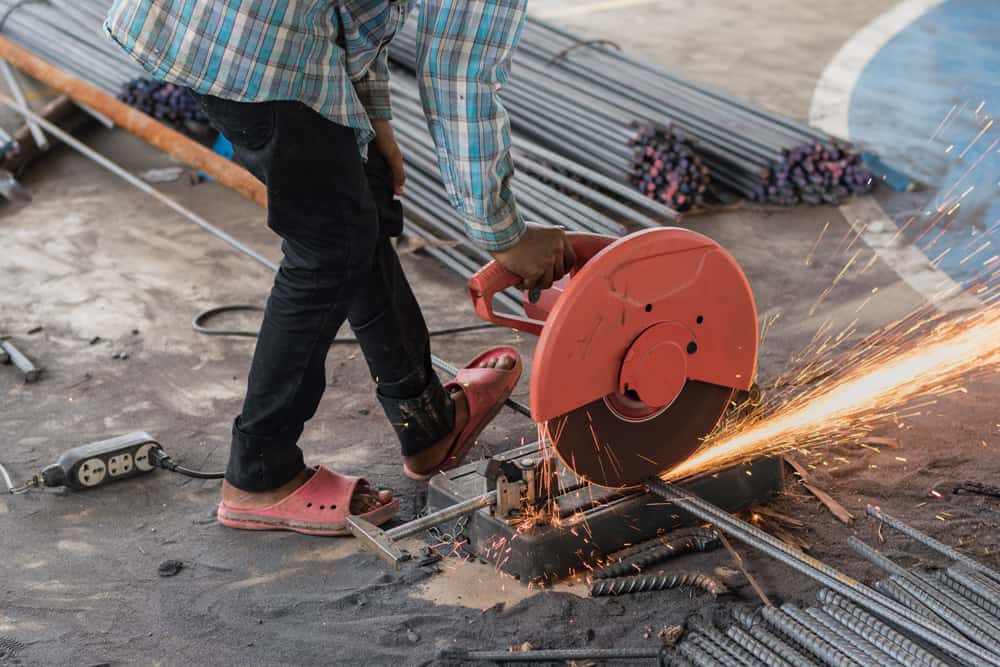
Construction worker cutting rebar with abrasive saw — no eye protection, sandals, sparks flyingActual AI output
Job siteRiverside Building
Hazards found8 total · 2 critical · 3 high · 3 medium
Generated in22 seconds
Compliance Score
Critical — immediate work stoppage recommended
25/100

“Worker operating an abrasive cut-off saw (chop saw) to cut rebar on an outdoor construction site with multiple critical PPE and safety violations.”

CRITICALPPE — Eye/Face Protection

Worker operating abrasive cut-off saw without eye protection or face shield while sparks are actively generated.

OSHA Reference: 29 CFR 1926.102
Corrective action. Immediately stop work and require worker to wear safety glasses with side shields at minimum, and a face shield when operating grinding or cutting equipment.
ANSI Z87.1 safety glassesFace shieldWork stoppage until PPE donned
CRITICALPPE — Footwear

Worker wearing inappropriate footwear (casual shoes/sandals) instead of safety boots while operating heavy equipment around metal materials.

OSHA Reference: 29 CFR 1926.96
Corrective action. Require steel-toed or safety-rated work boots; prohibit open-toed or casual footwear on construction sites.
ASTM-rated safety bootsToe protectionMetatarsal guards recommended
HIGHPPE — Hand Protection

Worker not wearing gloves while handling rebar and operating cutting equipment.

OSHA Reference: 29 CFR 1926.95
Corrective action. Provide and require cut-resistant or leather work gloves for material handling and equipment operation.
Cut-resistant glovesLeather work gloves
View all 5 remaining hazards2 HIGH · 3 MEDIUM ↓
HIGHPPE — Hearing Protection

No visible hearing protection while operating loud abrasive cut-off saw (typically 100+ dBA).

OSHA Reference: 29 CFR 1926.101 and 1926.52
Corrective action. Provide and require hearing protection (earplugs or earmuffs) for all workers operating or near loud power tools.
Hearing protection 25–30 dB NRREarplugs or earmuffs
HIGHFire Hazard — Hot Work

Grinding sparks being generated in area with combustible materials visible (wood beam/table nearby); no fire extinguisher visible.

OSHA Reference: 29 CFR 1926.352
Corrective action. Establish hot work permit procedure, clear combustibles from area, position fire extinguisher within immediate reach, assign fire watch.
Fire extinguisher (Class ABC)Remove combustibles 35 ft radiusFire watch personnelHot work permit
MEDIUMHousekeeping

Poor housekeeping with materials scattered on ground, electrical cords creating trip hazards, rebar pieces laying loosely on surface.

OSHA Reference: 29 CFR 1926.25
Corrective action. Organize work area, secure loose materials, route electrical cords safely, remove metal debris regularly.
Material storage racksCord management systemRegular cleanup schedule
MEDIUMElectrical Safety

Electrical extension cord on ground in work area where metal debris and moisture may be present; potential for damage.

OSHA Reference: 29 CFR 1926.405
Corrective action. Elevate or protect electrical cords, inspect for damage regularly, use GFCI protection for all temporary power.
GFCI-protected outletsElevated cord routingRegular cord inspection
MEDIUMTool Guarding

Cannot verify if abrasive wheel guard is properly positioned on cut-off saw from this angle.

OSHA Reference: 29 CFR 1926.303
Corrective action. Verify wheel guard is in place and properly adjusted to maximum protection position; inspect before each use.
Proper guard adjustmentPre-use equipment inspection
Generated by Claude AI on a real construction photo · 22 seconds end-to-end

Ready to scan your own photos?

AI Hazard Scan is included with SafeBrief Pro — $19/month. Start with a free SafeBrief account to access daily briefings, then upgrade to Pro when you're ready for photo evidence and AI Hazard Scan.

Start Free AccountSee Pro Pricing — $19/mo

Free includes daily briefings, 8-point site check, and crew sign-in. AI Hazard Scan requires Pro.

📝 Annotate Photos Like a Pro

Found a hazard? Don't just identify it — mark it up. SafeBrief Pro includes canvas-based photo annotation tools built for skilled foremen:

Draw circles

Tap to circle the specific hazard so there's no ambiguity about what you saw.

Add arrows

Point to the exact concern — missing guardrail, frayed strap, exposed conduit.

T
Type notes on photos

Place text labels directly on the image. Save annotated versions in your reports.

Undo & redo

Try different markup until it reads clearly to whoever sees the report next.

Document everything — compliance and hazards. OSHA inspectors trust photos. Smart foremen know to capture both sides: a photo of fall protection in place is just as valuable as a photo of a guardrail gap. SafeBrief attaches photos to every site-check answer — Yes (compliance evidence) and No (hazard documentation) — so your audit trail tells the whole story.

OSHA-aligned, not OSHA-replacement

The AI cites real OSHA standards from 29 CFR 1926 (Construction Industry) and 29 CFR 1910 (General Industry) when applicable. It's a screening tool that helps qualified safety personnel identify common hazards faster and more consistently — not a substitute for site-specific judgment, a competent person, or formal inspections.

Where teams use it

🚶
Daily site walks

Foremen scan the work area before shift to catch overnight changes.

🌅
Pre-shift inspections

Supervisors document conditions with photo evidence and AI-prioritized findings.

🔎
Incident investigations

Capture the scene immediately; AI surfaces contributing hazards alongside human analysis.

🎓
Training new workers

Show real photos with AI annotations — concrete examples of what 'unsafe' looks like.

🤝
Contractor oversight

GCs document subcontractor compliance with timestamped, OSHA-referenced photo scans.

📝
Audit prep

Maintain a searchable history of resolved hazards before regulators arrive.

Why this works

  • Built on Claude AI from Anthropic. Same vision model behind enterprise AI tools — purpose-prompted for OSHA-aligned safety analysis.
  • Construction-specific prompts. We don't ship a generic image classifier. The system prompt is a 200-line OSHA inspector brief.
  • OSHA-citation aware. References 29 CFR 1926 and 1910 standards by section, not vague advice.
  • Bilingual. Switch the language toggle and the entire analysis comes back in Spanish — including standards references and PPE callouts.
  • Mobile-first. Designed for capture-from-the-field on the phone your foreman already carries — including direct camera capture, not just gallery upload.

Included with SafeBrief Pro

AI Hazard Scan is part of SafeBrief Pro at $19/month. Built for skilled foremen — unlimited photo-based hazard scans, photo evidence in PDFs, unlimited cloud history, and audit-ready OSHA reports.

See all plans →Start with Free first

Common questions

How does AI Hazard Scan work?
Take a photo of any work area with your phone. Claude AI analyzes the image for fall protection issues, PPE compliance, housekeeping hazards, equipment defects, electrical safety issues, and other OSHA violations. You get specific hazard descriptions, severity ratings, OSHA standard references, and recommended corrective actions in 15 to 30 seconds.
How accurate is the AI?
AI Hazard Scan is a screening tool, not a substitute for a qualified safety professional. It identifies common, visible hazards quickly and consistently — useful for daily site walks, pre-shift inspections, training, and contractor oversight. A competent person should always verify findings and exercise professional judgment before taking action.
Does it identify specific OSHA violations?
Yes. The AI references real OSHA standards from 29 CFR 1926 (Construction) and 29 CFR 1910 (General Industry) when applicable — for example 1926.501 for fall protection, 1910.147 for lockout/tagout, or 1926.451 for scaffolding.
What types of hazards can it detect?
Fall protection gaps, missing or improper PPE, housekeeping hazards, electrical safety issues, equipment defects, trip and fall hazards, lockout/tagout compliance, scaffolding deficiencies, ladder safety issues, and more. The AI is trained for construction, manufacturing, oil & gas, and general industry environments.
Is my photo data stored?
Photos and scan results are saved to your SafeBrief account so you can build a searchable safety history. Only you and SafeBrief administrators can access your scans, enforced by row-level security. Photos are not shared with third parties beyond Anthropic for the actual analysis.
Which plan includes AI Hazard Scan?
AI Hazard Scan is included with SafeBrief Pro ($19/month). Business users get up to 10 scans per day along with everything in Pro — toolbox talks, OSHA inspections, JHA builder, equipment registry — plus multi-site dashboards, incident reporting, and predictive insights.
Does it work in Spanish?
Yes. Toggle the language and the AI responds in Spanish — hazard descriptions, OSHA references, and corrective actions all translated. Same coverage as the rest of SafeBrief's bilingual platform.
Can I download a report?
Yes. Every scan can be exported as a PDF for audit documentation, incident files, or contractor reports — including the original photo, hazards identified, OSHA references, and corrective actions.

Spot hazards before they become incidents.

SafeBrief Pro at $19/month includes AI Hazard Scan, Smart Daily Briefing with photos, photo evidence in PDFs, and audit-ready OSHA reports. Built for skilled foremen who need documentation. Cancel anytime.

See Business pricing →Start free account first

Free account → unlimited toolbox talks. AI Hazard Scan requires Business upgrade.